The Evening Scalper Pro is a state-of-the-art mean-reversion trading system designed to operate during the American trading session. Unlike traditional scalping systems, it focuses on cross pairs with a strong mean-reverting tendency and high profit targets. The EA enters the market with market orders between 19:00 and 23:00 (GMT), avoiding trading during rollover (0:00-1:00 GMT). Trades are typically short-term, lasting only a few hours at most.
Supported Currency Pairs: EURNZD, EURAUD, AUDNZD, NZDCAD, AUDCAD, EURGBP, GBPAUD, GBPCAD
Recommended Timeframe: M5
Key Features:
- Advanced algorithm for identifying market trends and mean-reverting tendencies
- Market execution with precise entry and exit points
- Multiple currency pair support with one-chart setup
- Does not trade during periods of low liquidity or rollover
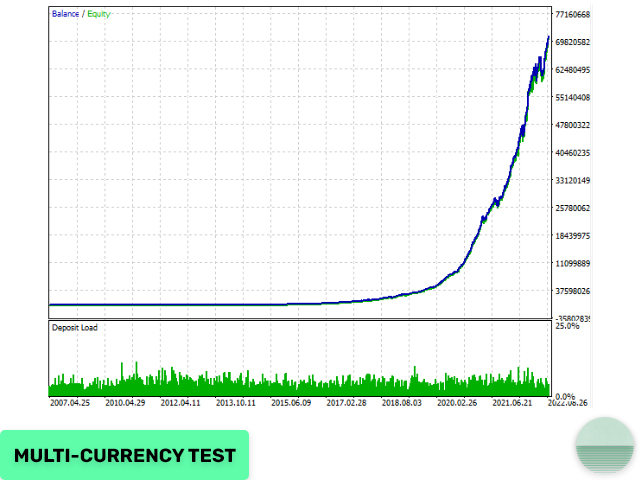
- Solid backtest and live performance results
- FIFO compatible
Requirements:
- Good brokerage conditions with low spread and slippage during rollover
- Recommended to run on a VPS continuously for optimal performance
Installation Instructions:
- Download the EA from the provided source.
- Open your MetaTrader platform.
- Navigate to the “File” menu and select “Open Data Folder.”
- Locate and open the “MQL4” or “MQL5” folder, then open the “Experts” folder.
- Copy the EA file (ex4 or mq4) into the “Experts” folder.
- Restart your MetaTrader platform.
- Attach the EA to a single M5 chart, such as EURUSD.
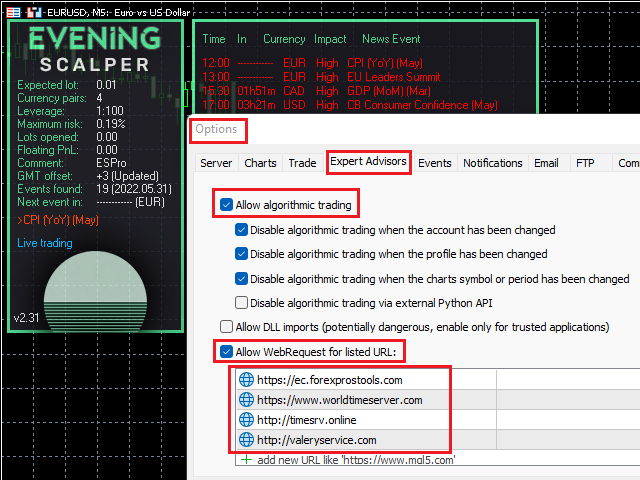
- Add the Required URLS in tools/experts tab.
- Configure the EA settings according to your trading preferences.
Settings:
- Allow Opening a New Trade
- Lot-sizing Method
- Fixed Lot
- Dynamic Lot
- Maximum Lot
- Maximum Spread
- Maximum Slippage
- Maximum Symbols at a Time
- Allow Buy/Sell
- Maximum Drawdown Percent
Strategy:
- Symbols Separated by Comma
- Hour to Start/Stop Opening Orders
- Smart Time Filter
- Hour to Stop Trading (on Friday)
- New Year Holiday Filter
- StopLoss, in pips
- Hide StopLoss
- Swap Filter
- Max Negative Swap, in pips
- News Filter Enabled
Others:
- Trade Comment
- UID (0…9)
- ShowPanel
- GMT/DST Test










Reviews
Clear filtersThere are no reviews yet.